
🧑💻 API Documentation
AtomicHost User API
⚠️ Security warning — keep your API key private
Never share your API key with anyone or with an application you do not trust. Anyone with access to it can use the API with the same service permissions as your account.
Generating an API key
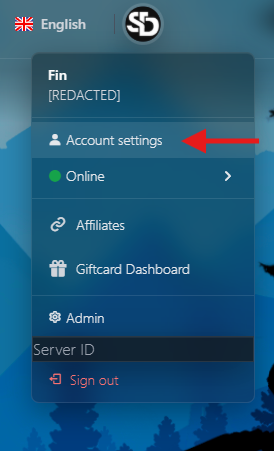
1. Open Account Settings
Select your user icon in the top-right corner, then choose Account Settings.
2. Open API Access
Select API Access.

3. Name your API key
Scroll to Manage Key and enter a name for the key.

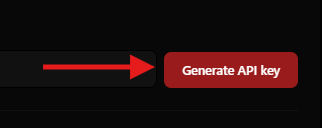
4. Generate the key
Select Generate API Key.
5. Copy and store the key securely
Select Copy and save the key in a secure location, such as a password manager or secrets vault.

Important key details
- Each account can have one active API key at a time.
- The full key is shown only once, immediately after it is generated.
- Regenerating a key immediately invalidates the previous key.
- Keys use this format:
ah_xxxxxxxxxxxxxxxxxxxxxxxxxxxxxxxxxxxxxxxxxxxxxxxxxxxx - AtomicHost stores only a salted SHA-256 hash of the key, so a lost key cannot be recovered.
API overview
The AtomicHost User API allows you to manage your own game services programmatically. It provides the same service access and permissions available through the AtomicHost web panel.
| Setting | Value |
|---|---|
| Base URL | https://atomichost.xyz/api/client/v1 |
| Authentication | Bearer API key |
| Request and response format | JSON |
| Required response header | Accept: application/json |
| Default daily allowance | 2,500 credits per day |
Note: This API is separate from the administrator Application API, which is available at
/api/v1.
Using the AtomicHost API
1. Authentication
Send your API key in the Authorization header as a Bearer token:
Authorization: Bearer ah_your_key_here
Accept: application/json
Every authenticated request is checked server-side to confirm:
- The API key is valid and active.
- The account exists and is not banned or suspended.
- The account has permission to access the requested service and action.
- The request is within the applicable rate and credit limits.
2. Credits and rate limits
Two independent protections apply to API usage:
| Protection | Default limit | Response when exceeded |
|---|---|---|
| Daily credits | 2,500 per day, configurable by an administrator | 429 daily_credit_limit_reached |
| Per-key rate limit | 120 requests per minute | 429 rate_limited |
Credit usage
- Most requests cost 1 credit.
- Opening a console stream costs 5 credits.
- Reading from or sending commands while a console stream is already open does not cost additional credits.
- Credits reset once per day using the server's configured timezone.
- Requests that fail because of a server-side
5xxerror are refunded.
Every response includes rate-limit and credit information:
X-RateLimit-Limit: 120
X-RateLimit-Remaining: 119
X-Credits-Limit: 2500
X-Credits-Used: 12
X-Credits-Remaining: 2488
X-Credits-Reset: 2026-06-28T00:00:00+00:00
3. Response and error formats
Successful response
{
  "success": true,
  "data": {}
}
Error response
{
  "success": false,
  "error": {
    "code": "forbidden",
    "message": "..."
  }
}
HTTP status codes
| Status | Meaning |
|---|---|
200 / 201 |
Request completed successfully |
401 |
API key is missing, invalid, revoked, or expired |
403 |
The account is banned, or the user does not have permission for the requested service or action |
404 |
The service does not exist or is not accessible by the authenticated user |
422 |
Validation failed, such as an invalid path or power signal |
429 |
The rate limit or daily credit allowance has been exceeded |
502 |
The service backend could not be reached |
Common error codes
missing_tokeninvalid_keyaccount_bannedinsufficient_service_permissionfeature_unavailableservice_inactivenot_foundvalidation_failedrate_limiteddaily_credit_limit_reachedtoo_many_streamsbackend_unavailable
4. Permission model
The API never grants more access than the AtomicHost website.
For every service action, AtomicHost verifies that:
- You are the service owner, an administrator, or a member who has been granted the required permission, such as
console,files, orbackups. - The service is active and its package includes the requested feature.
When another user shares a service with you, the API only allows the permissions granted by that service's owner.
Service IDs supplied in requests are never trusted. Attempting to access a service that is not available to your account returns 404, preventing the API from revealing whether that service exists.
5. Endpoints
Account
GET /me
Returns information about the API key owner, the active API key, and the account's current credit usage.
curl "https://atomichost.xyz/api/client/v1/me" \
  -H "Authorization: Bearer ah_your_key" \
  -H "Accept: application/json"
Example response:
{
  "success": true,
  "data": {
    "user": {
      "id": 42,
      "username": "steve",
      "email": "[email protected]"
    },
    "api_key": {
      "name": "My Key",
      "prefix": "ah_ab12cd34",
      "created_at": "2026-06-27T10:00:00+00:00",
      "last_used_at": "2026-06-27T12:00:00+00:00"
    },
    "credits": {
      "limit": 2500,
      "used": 12,
      "remaining": 2488,
      "reset_at": "2026-06-28T00:00:00+00:00",
      "reset_timezone": "UTC"
    }
  }
}
Services
GET /servers
Lists every service the authenticated user can access, including services they own and services shared with them.
Example response:
{
  "success": true,
  "data": [
    {
      "id": 101,
      "name": "My Rust Server",
      "status": "active",
      "service": "pterodactyl",
      "package": {
        "id": 5,
        "name": "Rust 4GB"
      },
      "role": "owner",
      "created_at": "2026-06-01T00:00:00+00:00",
      "due_date": "2026-07-01T00:00:00+00:00"
    }
  ]
}
GET /servers/{id}
Returns information about a single service.
The authenticated user must have an existing relationship with the service.
GET /servers/{id}/status
Returns the service's live power state, suspension status, and resource usage.
Example response:
{
  "success": true,
  "data": {
    "id": 101,
    "state": "running",
    "is_suspended": false,
    "resources": {
      "memory_bytes": 1073741824,
      "cpu_absolute": 42.5,
      "disk_bytes": 5368709120
    }
  }
}
POST /servers/{id}/power
Sends a power signal to the service.
Required permission: console
Request body:
{
  "signal": "start"
}
Valid signals:
startstoprestartkill
Example response:
{
  "success": true,
  "data": {
    "signal": "start",
    "accepted": true
  }
}
Console
All console endpoints require the console permission.
POST /servers/{id}/console/command
Sends a single command to the service console. Commands are audited.
Request body:
{
  "command": "say hello"
}
Example response:
{
  "success": true,
  "data": {
    "sent": true
  }
}
GET /servers/{id}/console/stream
Opens a live console output stream using Server-Sent Events.
Cost: 5 credits each time a stream is opened.
Stream behaviour
- The connection is controlled by the server.
- If the account is banned or loses access, the stream closes within approximately 15 seconds.
- Streams automatically close after the configured maximum duration, which is 10 minutes by default.
- Reconnect to continue receiving output after a stream closes.
- Each account can have up to 3 concurrent streams.
SSE event types
| Event | Description |
|---|---|
ready |
The stream is connected and ready |
output |
A line of console output |
status |
A service power-state update |
stats |
Resource usage data in JSON format |
error |
A stream error occurred |
closed |
The stream was closed |
Example JavaScript:
const es = new EventSource(
  "https://atomichost.xyz/api/client/v1/servers/101/console/stream"
);

es.addEventListener("output", (event) => {
  console.log(event.data);
});

es.addEventListener("closed", () => {
  es.close();
});
Important: A browser's native
EventSourceAPI cannot set anAuthorizationheader. Consume the stream through a trusted server, a CLI tool such ascurl, afetch()stream reader, or another client that supports custom headers. Send commands separately through the/console/commandendpoint.
Example using curl:
curl -N "https://atomichost.xyz/api/client/v1/servers/101/console/stream" \
  -H "Authorization: Bearer ah_your_key" \
  -H "Accept: text/event-stream"
Files
All file endpoints require the files permission.
File paths are checked for directory traversal. Paths containing .. segments are rejected with 422 before any request is sent to the service backend.
| Method | Endpoint | Body or query |
|---|---|---|
GET |
/servers/{id}/files?path=/ |
Lists a directory |
GET |
/servers/{id}/files/contents?path=/server.properties |
Reads a file |
POST |
/servers/{id}/files/write |
{ "path": "/a.txt", "content": "..." } |
POST |
/servers/{id}/files/delete |
{ "root": "/", "files": ["a.txt"] } |
POST |
/servers/{id}/files/create-folder |
{ "root": "/", "name": "plugins" } |
PUT |
/servers/{id}/files/rename |
{ "root": "/", "from": "a.txt", "to": "b.txt" } |
GET |
/servers/{id}/files/download?path=/world.zip |
Returns a one-time download URL |
GET |
/servers/{id}/files/upload-url?path=/ |
Returns a one-time upload URL |
Example request:
curl "https://atomichost.xyz/api/client/v1/servers/101/files?path=/" \
  -H "Authorization: Bearer ah_your_key" \
  -H "Accept: application/json"
Example response:
{
  "success": true,
  "data": {
    "path": "/",
    "files": [
      {
        "name": "server.properties",
        "size": 1234,
        "is_file": true,
        "mode": "rw-r--r--"
      }
    ]
  }
}
Backups
All backup endpoints require the backups permission.
| Method | Endpoint | Body |
|---|---|---|
GET |
/servers/{id}/backups |
Lists backups |
POST |
/servers/{id}/backups |
{ "name": "pre-update", "ignored": "" } |
GET |
/servers/{id}/backups/{backup} |
Returns information about a backup |
DELETE |
/servers/{id}/backups/{backup} |
Deletes a backup |
Example request:
curl -X POST "https://atomichost.xyz/api/client/v1/servers/101/backups" \
  -H "Authorization: Bearer ah_your_key" \
  -H "Accept: application/json" \
  -H "Content-Type: application/json" \
  -d '{"name":"pre-update"}'
Example response:
{
  "success": true,
  "data": {
    "backup": {
      "uuid": "f3...",
      "name": "pre-update",
      "is_locked": false
    }
  }
}
Reinstall a server
POST /api/client/v1/servers/{order}/reinstall
Reinstalls the service: stops it and re-runs the egg install script that originally provisioned it. Existing server files are not wiped, but the install script may overwrite some of them — back up anything important first.
This is an asynchronous operation. The call returns as soon as the reinstall is
accepted; poll GET /servers/{order}/status to watch the
server move through installing back to a running state.
Permissions: requires the settings feature on the service's package, and
(for shared/sub-users) the equivalent service permission. Owners and admins
always qualify.
Credit cost: 25
Path parameters
| Name | Type | Description |
|---|---|---|
order |
int | The service (order) ID |
Example request
curl -X POST https://atomichost.xyz/api/client/v1/servers/{SERVER_ID}/reinstall -H "Authorization: Bearer YOUR_API_KEY"
7. Banned or suspended accounts
When an account is banned or suspended:
- All API keys are revoked immediately.
- Active console streams are closed.
- Further API requests are rejected with
403.
Removing a ban or suspension does not restore the previous API key. A new key must be generated before the API can be used again.